VENATOR / AN ASTERHORN PRODUCT

venator

One place to
run the day.

Plan shifts, assign tasks, book clients and keep track of hours across every location—in one workspace on web and mobile, instead of spreadsheets and group chats.

✓   Fully staffed · 2 / 2✳   Swaps & leave clashes flagged
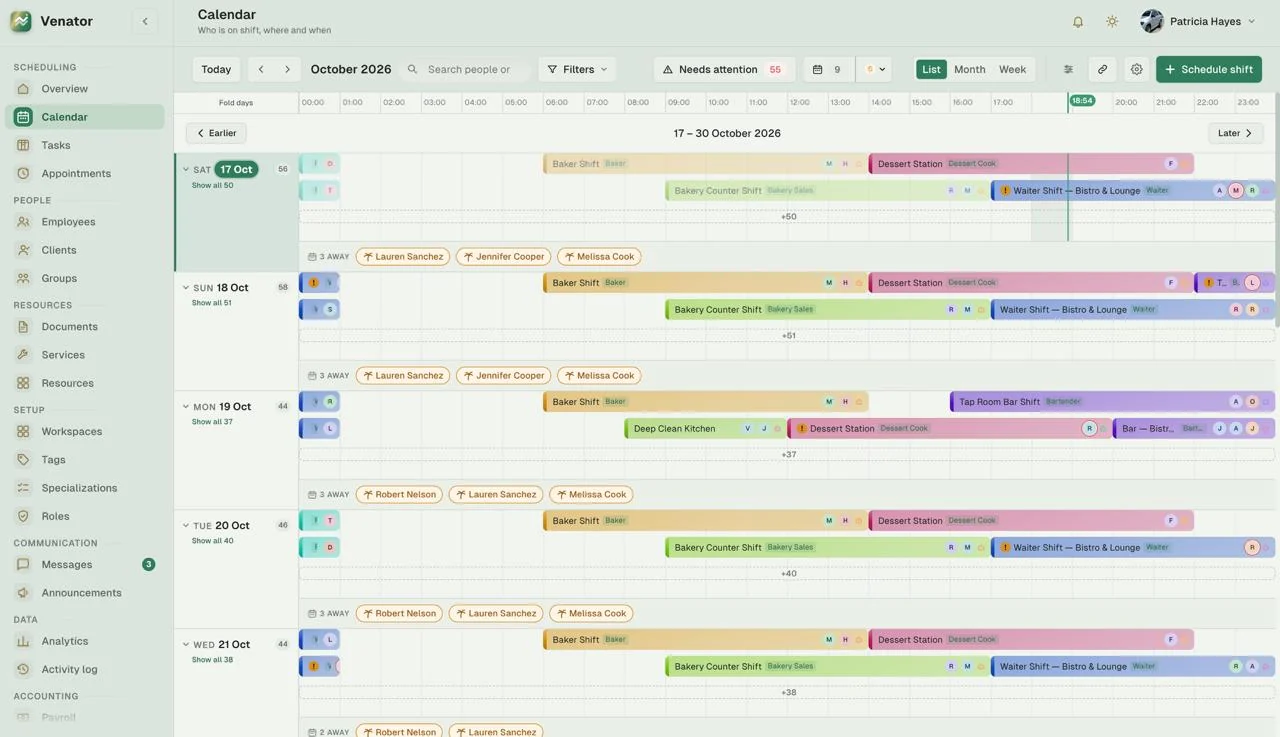
Venator calendar in list view: each day’s shifts on a timeline, colored by workspace, with the people away that day listed underneath.

WORK CONNECTED

Teams. Time. Tasks.
All connected.

Venator is an operations platform for businesses that run on shifts, locations and bookings. Each workspace keeps its own people, services and schedule—and every shift, task and appointment links back to the person doing the work.

People→Shifts→Workspaces→Resources→Tasks

INSIDE VENATOR

A closer look.

Real screens from Venator, filled with demo data from a fictional restaurant group.

01 / SHIFTS

Shifts that know who they need.

Every shift has a place, a time and the skill it calls for. Assign people, see who has confirmed, and publish when the schedule is ready.

  • A required specialization on each shift, such as Bartender
  • Confirmations and a clear “fully staffed” status
  • Overnight shifts that end the next day, one-off or repeating
  • Tasks attached to the duty itself
  • Notifications by push and in the app, or by email
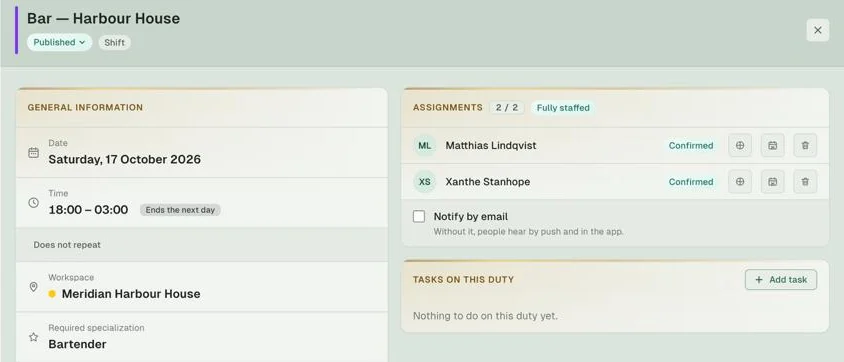
Shift details for “Bar — Harbour House”: Saturday 18:00–03:00, ending the next day, requiring a bartender, with two confirmed assignments and marked fully staffed.
02 / TASKS

Tasks with a place and a deadline.

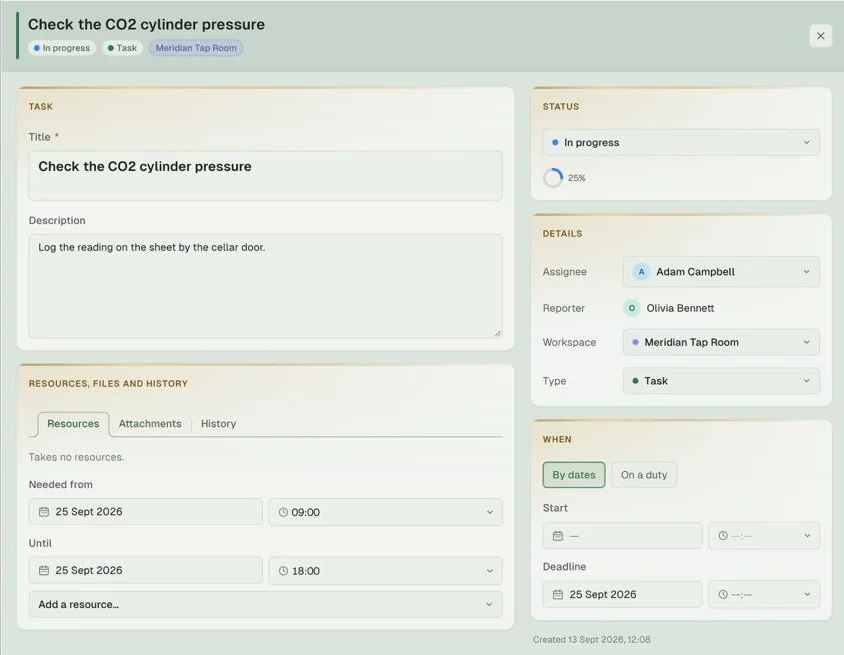
Run work on a board or a list with your own statuses. A task can belong to a workspace or stay personal, and be scheduled by dates or tied to a specific duty.

  • Board and list views with custom status columns
  • Assignee, reporter, workspace, type and progress
  • Resources reserved for the hours they are needed
  • Attachments and a full change history
Task details for “Check the CO2 cylinder pressure”: in progress at 25%, with assignee, reporter, workspace, reserved resources, dates and a deadline.
03 / PEOPLE

Everything about a person, on one card.

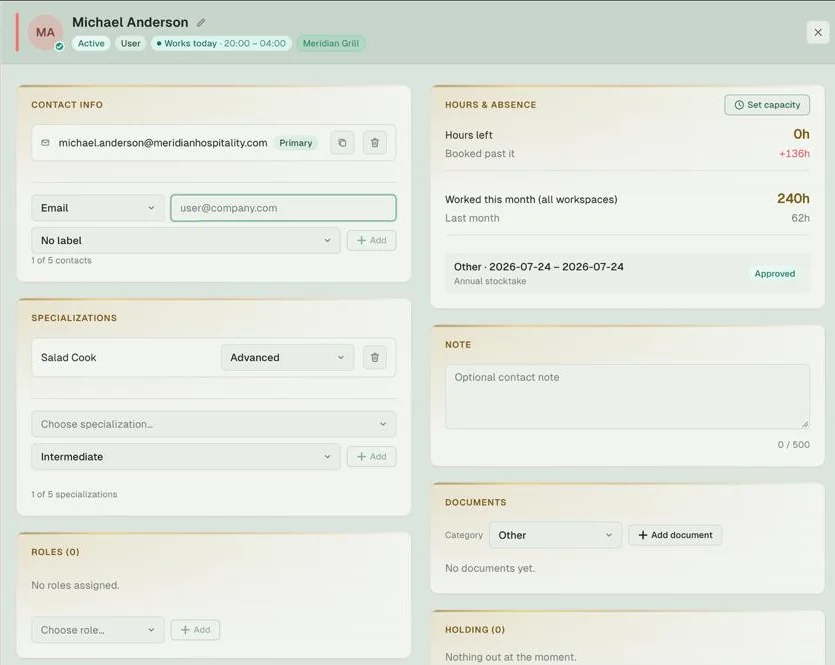
Contacts, skills, roles, hours and documents live together, so whoever plans the week has the full picture.

  • Specializations with skill levels
  • Hours left against capacity, and hours worked across all workspaces
  • Approved absences, on the card and in the calendar
  • Roles, documents and the equipment someone is holding
Employee card: contact details, a Salad Cook specialization at Advanced level, roles, hours left and hours worked this month, an approved absence, notes and documents.
04 / CLIENTS

Know your regulars.

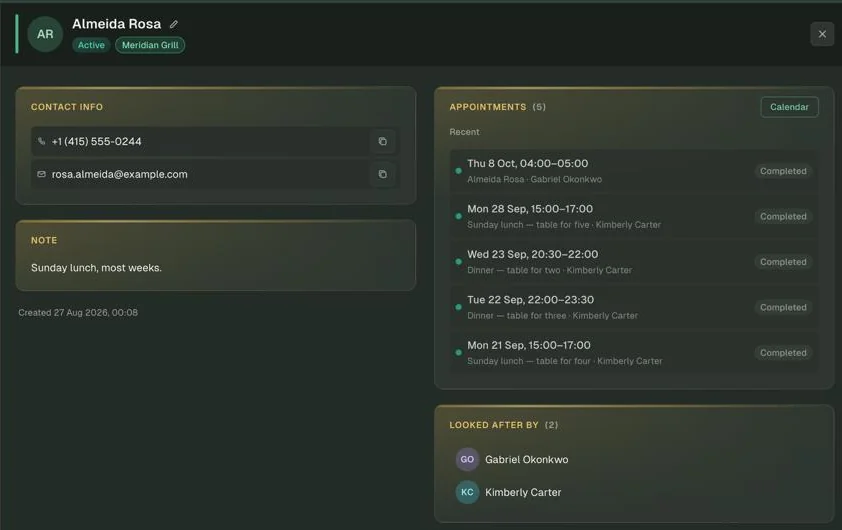
Client cards keep contact details, notes and every appointment in one place—along with the people on your team who look after them.

  • Appointment history with status
  • Book the next visit straight from the card
  • Assign the team members who look after each client
  • Notes for the details that matter
Client card in dark mode: phone and email, a note, five recent completed appointments and the two team members who look after this client.
05 / WORKSPACES

Every location, its own workspace.

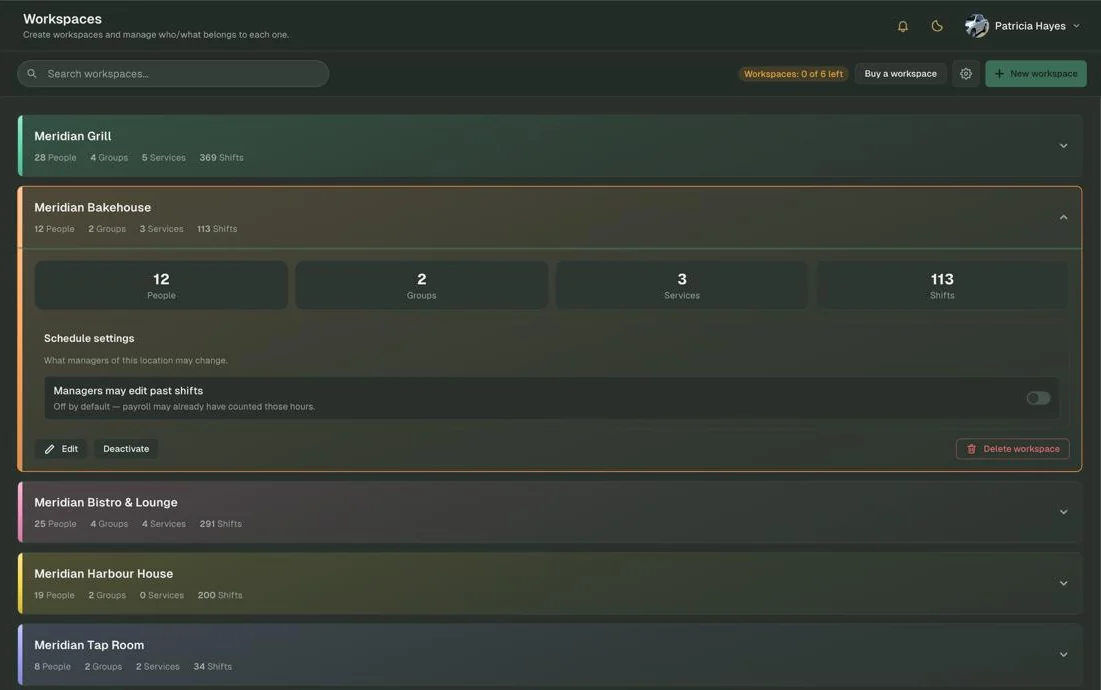
Each venue or site gets a workspace with its own people, groups, services and shifts, color-coded across the calendar and task board.

  • Groups for each workspace, such as Kitchen or Waiters
  • Per-location rules, like whether managers may edit past shifts
  • Add a workspace whenever you open a new location
Workspaces list in dark mode: five restaurant locations with their people, groups, services and shifts, one expanded to show its schedule settings.

YOUR DAY

Everyone starts
with their own day.

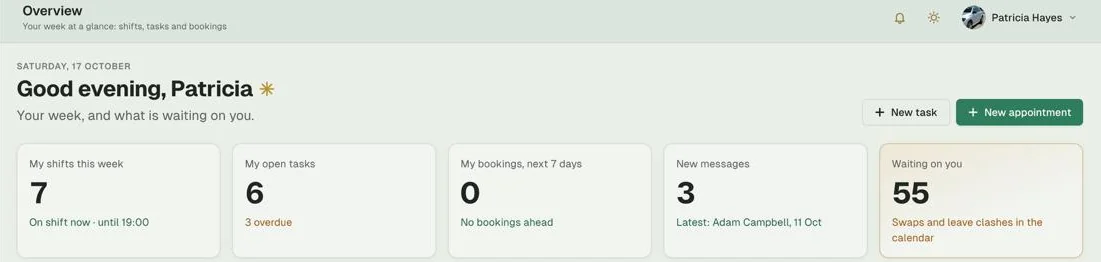
Overview shows each person their shifts this week, open and overdue tasks, bookings for the next seven days and new messages. Managers also see what is waiting on them—shift swaps and leave clashes to sort out.

Personal overview: shifts this week, open and overdue tasks, bookings in the next seven days, new messages and items waiting for a decision.

PLATFORM CAPABILITIES

Less switching.
More doing.

Explore the product areas below. For current availability, supported workflows and plan details, contact us.

Scheduling

Overview · Calendar · Tasks · Appointments

A shift calendar across every location, tasks on a board or a list, client appointments, and a personal overview for everyone.

People

Employees · Clients · Groups

Employee profiles with skills, roles, hours and absences; client cards with appointment history; groups for every team.

Resources

Documents · Services · Resources

Documents for people and groups, the services you offer, and the equipment and spaces the work depends on.

Setup

Workspaces · Tags · Specializations · Roles

A workspace per location, tags, specializations with skill levels, and roles that decide who can do what.

Communication

Messages · Announcements

Direct conversations and announcements for the whole team, with push notifications.

Data

Analytics · Activity log

Reports across your workspaces and a log of what changed, and who changed it.

Accounting

Payroll · Cash book

Payroll that counts hours straight from shifts, with a cash book alongside it.

Web & Mobile

Web app · Mobile apps · Light & dark

Web and mobile apps on every plan, push notifications, light and dark themes, and a choice of language.

WHO IT’S FOR

Made for work
that doesn't stop.

For organizations balancing people, locations, schedules and bookings, Venator keeps the day-to-day connected.

01

Restaurants & Hospitality

Schedules for every venue, kitchen and bar skills on each shift, late closes past midnight, and regulars who book most weeks.

02

Appointment-Based Services

Services, bookings and client history in one place, with the team members who look after each client.

03

Field, Cleaning & Facilities

Shifts across many sites, tasks tied to a duty, and equipment that goes out and comes back.

PLANS & PRICING

Start small.
Add as you grow.

Every plan includes the web and mobile apps, calendar, shifts and tasks, push notifications, service emails and phone number confirmation. Need more seats, workspaces or storage? Add them whenever you need them.

Basic

€29/ month

The essentials.

Team members
5+€3.00 each
Workspaces
1+€9.00 each
Storage
5 GB+€3.00 per 10 GB

Standard support

Lite

€59/ month

Combined calendar, extended permissions and reports.

Team members
10+€3.00 each
Workspaces
3+€9.00 each
Storage
10 GB+€3.00 per 10 GB

Standard support

Pro

€99/ month

Everything in Lite, plus advanced analytics and integrations.

Team members
25+€2.50 each
Workspaces
5+€8.00 each
Storage
30 GB+€3.00 per 10 GB

Priority support

Prices per month, in euros. Request a demo for help choosing a plan and details about billing and taxes.

BUILT BY ASTERHORN

Our own product.
The same engineering values.

Building Venator gives us the perspective of a product owner: thoughtful architecture, real operational workflows, maintainability and continuous improvement. That product mindset also informs our client engineering work.

About Asterhorn
ASTERHORN×venatorEngineering discipline meets product ownership.

DISCOVER VENATOR

See how connected
operations could work.

Get in touch for a product conversation or a demo.

Request a demo